

Windows
For your desktop and server.
Explore Windows downloadsSQL Studio / Independent & open source
Open-source database development, design and administration for the MySQL and MariaDB ecosystems.
A community-driven evolution of MySQL Workbench’s foundations. Familiar tools, independently maintained.
Explore SQL Studio’s MySQL Workbench roots and compatibility →
Windows · macOS · Linux / GPLv2
From the first query to the full picture
Develop, design, administer, migrate and monitor. Explore the tools at the heart of SQL Studio.
Create and manage connections to database servers, then use the integrated editor to work with your SQL.
Explore featureUse the Entity-Relationship diagram editor to design and visualize your database schema and its relationships.
Explore featureAdminister user accounts and privileges through the graphical interface.
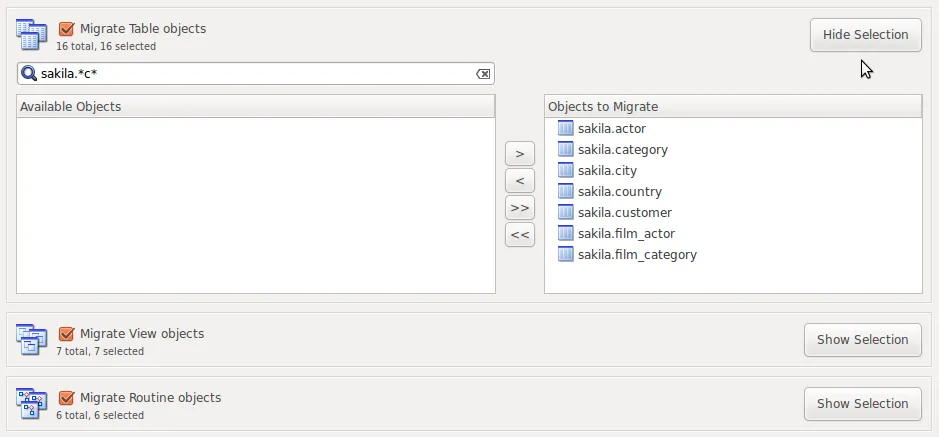
Explore featureThe migration wizard handles schema mapping from a source database to the target database.
Explore featureBuilt-in dashboards display real-time performance metrics for a view of server activity.
Explore feature01 / SQL development
Manage connections, write SQL with highlighting and auto-completion, execute queries, and inspect the results. Revisit query history or look deeper with visual explain plans.
Explore the SQL editor ↗-- A little structure. A clearer picture.
SELECT
table_name,
table_rows
FROM information_schema.tables
WHERE table_schema = DATABASE()
ORDER BY table_name;02 / Data modeling
Design with ER diagrams. Turn models into databases, reverse engineer existing schemas, and synchronize a model with a live server.
Explore data modeling ↗03 / Server administration
Manage users and privileges, configure server options, perform backups and restores, inspect audit logs, and keep an eye on server health.
Explore administration ↗05 / Performance monitoring
Real-time dashboards, query analysis, index efficiency reporting and InnoDB status visualization help you investigate database behavior.
Explore performance tools ↗04 / Data migration
Schema mapping, data type conversion and transfer reporting guide migrations to MySQL or MariaDB.
Your setup, your choice
Check platform requirements and published release availability before you download.
For your desktop and server.
Explore Windows downloadsIntel and Apple Silicon.
Explore macOS downloadsBuilt for your distribution.
Explore Linux downloadsCompatibility, clearly stated
Version information follows the project README. Check release notes for the build you intend to use.
| Database | Versions listed | Status |
|---|---|---|
| MySQL | 5.7, 8.0, 8.1, 8.2, 8.3, 8.4 (LTS), 9.x | README-supported Listed as tested and supported in the project README. |
| MariaDB | 10.4, 10.5, 10.6 (LTS), 10.11 (LTS), 11.x | Upcoming support The README appends “support will be soon published” to this list. Treat MariaDB compatibility as upcoming until the project clarifies the scope. |
Built in the open
SQL Studio carries forward the architecture and codebase of MySQL Workbench as an independent open-source project. Its direction is shaped by contributors and database professionals.
Join the conversation ↗Your next database project starts here
Explore SQL Studio. Follow its progress. Help shape what comes next.